MyHyundai with Bluelink
- 4.6
- Rating
- 1.00M
- Installs
- Free
- Price

 Analysis by App-foxy
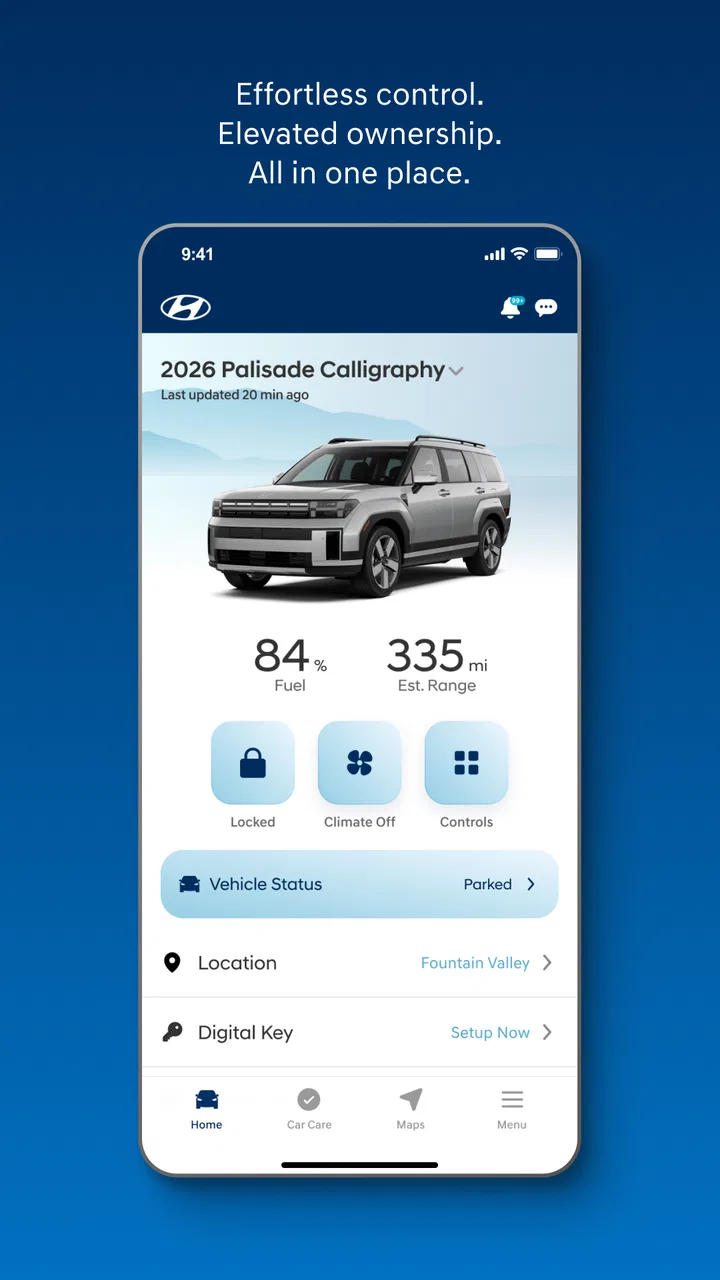
I tend to judge a connected-car app by a simple question: does it make an ordinary ownership task easier, or does it merely add another icon to my phone? MyHyundai with Bluelink is aimed at the first goal. It is a free productivity app from Hyundai Motor America that links a compatible Hyundai vehicle with a smartphone, giving owners a digital way to interact with their car instead of relying only on the physical key, the dashboard, or a browser.
That sounds straightforward, but the value depends heavily on how you use your Hyundai. If you regularly forget where you parked, want to check something before leaving home, or prefer handling vehicle-related tasks from one place, the app can become part of your routine. If you expect it to replace every function of a key fob or work as a universal car-control tool, you may find the experience less satisfying.
After spending time with it, I see MyHyundai with Bluelink as a practical companion rather than a complete ownership platform. Its best qualities come from convenience and centralization. Its weak points come from the fact that a phone app is still dependent on the vehicle, the account, the connection, and the exact Bluelink equipment available in that Hyundai.
You May Also Like

 Blood Strike: 2.5 Anniversary
Blood Strike’s Loadouts Turn Every Drop Into a Tactical Gamble
A close look at Blood Strike’s custom loadouts: how fast access to signature weapons reshapes its battle royale rhythm, rewards preparation, and narrows the gap between fights.

 Pandora - Music & Podcasts
Pandora’s Music Is Easy to Start, but Harder to Recover
Pandora’s strength is its low-effort path from a seed to a station. Its weak spot is how much confidence it asks you to place in connection, setup, and quiet recovery.

 8 Ball Pool
 Is Built on Rivalries, Rematches, and Routine
A close look at the rivalries, rematches, shared routines, and unanswered safety questions that turn a quick pool match into a persistent mobile community.

 Samsung Music
’s Quiet Strength Is Playing What You Already Own
Its reach comes less from spectacle than from dependable access to a personal library. That simplicity is both the app’s strongest retention engine and its ceiling.

 AccuWeather: Weather Radar
AccuWeather Review: A Quick, Clear Forecast for Everyday Decisions
For everyday plans, the best forecast is the one you can understand quickly. AccuWeather makes rain timing, radar, and local conditions easy to act on, with a few trade-offs.

 Hill Climb Racing
Why Hill Climb Racing Still Turns Crashes Into One More Run
A tiny car, a bumpy hill and one more upgrade: Hill Climb Racing keeps resurfacing because its simple chaos makes every near-miss feel personal.
More From Our News Desk



How I would decide whether MyHyundai is worth using
The first decision is compatibility. This is not a general-purpose app for any car with a Hyundai badge. It is built around a Bluelink-equipped Hyundai, so the vehicle itself is the starting point. Before investing time in setup, I would confirm that the particular car supports the service and that the owner has the information needed to connect it. A used-car buyer should be especially careful here, because the previous owner’s account setup and the current owner’s access are separate practical concerns.
The second decision is frequency of use. A connected-car app earns its place when it solves small problems repeatedly. For example, I might be leaving a supermarket and realize I cannot remember which row contains the car. Opening the app to check the vehicle’s status or locate it can be more convenient than walking around pressing a key button. That is not a dramatic feature, but it is exactly the kind of minor relief that makes an app useful over time.
The third criterion is whether I prefer one Hyundai-focused tool over a collection of alternatives. A physical key remains quicker for basic entry and starting. A phone’s map app is usually better for navigation. A dealership website may be more appropriate for account or ownership paperwork. The appeal here is having vehicle-focused information and controls gathered in one Hyundai environment, rather than expecting one unrelated app to understand the car.
I would also consider who else drives the vehicle. In a household with several drivers, a phone-based connection can be convenient, but it can also create confusion if everyone uses different accounts or assumes the app reflects the same state instantly. The app is most comfortable when one primary owner manages access and the family understands which tasks belong to the phone and which still belong to the key or the vehicle itself.
The everyday details that make the app useful
My favorite aspect is the reduction of small decisions. Instead of wondering whether I locked the car, I can use the app as a remote check rather than returning to the driveway. Instead of approaching the vehicle unsure of its status, I can look before leaving the house. These are modest advantages, but they matter on busy mornings, especially when the car is parked outside and I am already running late.
Another useful habit is checking the vehicle before a trip rather than after something feels wrong. I can treat the app as a quick pre-drive checkpoint: confirm the car’s reported state, think about where it is parked, and then decide whether I need to walk outside or take another action. This is more efficient than opening the app repeatedly without a purpose. The best workflow is deliberate: check, act if needed, and close it.
I also like the idea of using the app as a memory aid. When I park in an unfamiliar area, I can make a mental note of the vehicle’s position and use the app later as a second reference. It is not a replacement for paying attention to signs or remembering a garage level, but it reduces the stress of reconstructing the last few minutes of a long day.
There is a less obvious benefit for people who share a car but do not share the same schedule. One driver can check the vehicle without calling another person to ask whether it was locked or where it was left. That does not eliminate communication problems, but it can prevent unnecessary interruptions. In my experience, this kind of quiet convenience is more valuable than a flashy feature used once a month.
What the Hyundai-focused design gets right
Because the application comes from Hyundai Motor America, it feels more relevant to Hyundai ownership than a generic automotive utility could. The app’s purpose is not to make a broad claim about every vehicle. It is focused on connecting the owner’s phone with the owner’s Hyundai through Bluelink, which gives the experience a clear center.
That focus helps when I want to think about the car as a connected product rather than a machine that exists only when I am sitting inside it. The phone becomes a convenient place to begin a vehicle-related task. I do not have to remember a separate third-party service or search through unrelated tools every time I want to check something connected to the Hyundai.
The app is also approachable for ordinary users. It is free, carries an Everyone content rating, and has reached more than a million installs. Its average rating is 4.6 from about 116 thousand ratings, with roughly 19 thousand written reviews, so there is clear evidence that many owners find the overall concept worthwhile. I would not treat those figures as a guarantee for every vehicle or phone, but they do suggest that the basic ownership problem is real and widely understood.
Its long presence also matters to me. The app was released on July 28, 2014, and the current version is 5.4.4. That does not automatically make an app excellent, but it indicates an established product rather than a brand-new experiment. I am more comfortable trying a vehicle companion that has had time to evolve, especially when the alternative is relying on an unofficial workaround.
Where the experience can become frustrating
The biggest limitation is that the app cannot make the car respond to something it does not support. Bluelink equipment and vehicle capabilities vary, so two Hyundai owners may have noticeably different experiences. One person may regard the app as essential, while another may find that it offers too little beyond basic status information. That difference is not necessarily an app failure; it is a reminder to judge the service by the specific vehicle.
I also would not expect every action to feel as immediate as pressing a physical button. A phone must open the app, authenticate the request, communicate with the service, and reach the vehicle. Any weak point in that chain can make a simple command feel slower than using the key. For urgent situations, I would keep the physical key available and avoid treating the app as the only way to access or operate the car.
Another friction point is mental trust. When I use a physical control, I receive a familiar tactile response. With a phone, I need to read the app’s reported result and understand what that result means. If the screen is not clear or the status takes time to update, I may still wonder whether the vehicle actually changed state. That makes the app most useful for convenience checks, not for situations where uncertainty has serious consequences.
Notifications and phone habits can also influence the experience. A person who keeps many alerts disabled or rarely opens vehicle apps may not gain much from a connected service. Conversely, someone who checks the app constantly could waste time seeking updates that do not require attention. I recommend deciding which situations justify opening it and building a simple routine around those moments.
How it compares with the usual alternatives
The closest alternative is the traditional key fob. For immediate access beside the car, the key is usually the simpler choice: it is familiar, fast, and does not require opening a phone. MyHyundai wins when I am away from the vehicle and want a remote check or a vehicle-related action from a distance. The key wins when I am already standing next to the Hyundai and do not want to wait for an app.
A second alternative is doing everything manually. I can walk outside to check the car, return to confirm the doors, or write down where I parked. That approach costs no additional app effort, but it becomes inconvenient when the car is far away, the weather is poor, or I am managing several errands. The app’s advantage is not that it transforms ownership; it removes some repeated trips and moments of doubt.
Generic navigation and map apps are better at directions, traffic, and searching for places. I would not choose MyHyundai as my main navigation tool simply because it is connected to my car. Its role is different: it is vehicle-specific, while a map app is destination-specific. Using each for its strongest purpose is more sensible than trying to force one application to replace the other.
Some drivers may prefer a broader automotive platform that brings several vehicle makes into one dashboard. That can be attractive for a household with multiple brands or for someone who wants one interface for many services. The trade-off is that a Hyundai-specific app may be more relevant to the Hyundai itself. If I own only a compatible Hyundai, the focused approach is easier to understand than a universal app filled with options I do not need.
Dealership contact is another alternative, but it solves a different problem. A dealership can help with ownership questions or service conversations, while the app is designed for the owner’s ongoing relationship with the vehicle. I would not use the app as a substitute for professional assistance when the car needs attention. Instead, I would use it to stay organized between those larger interactions.
The real cost of switching to a connected routine
The price is easy to understand: the app is free. The less obvious cost is setup and habit. I need to connect the correct vehicle, use the appropriate owner account, and learn which functions are available for that Hyundai. This is not a financial barrier, but it is still a time investment. If I only drive the car occasionally, the setup may not feel worthwhile.
There is also a dependence cost. Once I begin checking the phone instead of the key, I may expect the app to be available whenever I need it. That makes good backup habits important. I would keep the physical key accessible, avoid assuming that a phone is always charged, and remember that a remote action is not the same as physically inspecting the vehicle.
Switching away from the app has a similar cost. If I stop using it, I return to manual checks and the key fob. That is perfectly acceptable for some owners, particularly those who dislike account-based services or do not want another app on their phone. The decision is therefore less about whether MyHyundai is universally necessary and more about whether its convenience offsets the small amount of digital maintenance it asks from me.
For a new Hyundai owner, I would try it early, while learning the vehicle. That gives me time to discover how the phone connection fits alongside the key and dashboard. For a second-hand owner, I would first make sure the vehicle is properly associated with the current account. A clean setup is more important than immediately exploring every screen, because confusion at the beginning can make the whole service feel unreliable.
Who should use it, and who should skip it
I recommend it most strongly to Hyundai owners with a Bluelink-equipped vehicle who often park away from home, share the car, or worry about whether they locked it. It is also a sensible choice for people who like keeping ownership tasks in one place and are comfortable using a smartphone as an extension of the car.
I am less enthusiastic for drivers who want instant, tactile control and rarely need to interact with the vehicle from a distance. If the key fob already handles everything they care about, the app may become unused clutter. It may also be a poor fit for someone who expects identical functions across every Hyundai, because the vehicle’s own equipment determines much of the experience.
People who are very privacy-conscious or who dislike connected services should make a deliberate choice rather than installing it automatically. The convenience is real, but it comes from linking a personal device and an account to the vehicle. If that relationship makes the owner uncomfortable, the traditional key-and-dashboard routine may be preferable.
My recommendation after weighing the trade-offs
My overall view is positive, with an important condition: use MyHyundai with Bluelink as a convenience layer, not as the sole way to manage the car. It is strongest when I am away from the Hyundai and need a quick vehicle-focused check or action. It is weaker when I am standing beside the car, need an immediate physical response, or expect features that the particular vehicle does not support.
The app’s free price lowers the risk of trying it, and its established history, 4.6 average, and broad adoption make it a reasonable first choice for the intended Hyundai owner. I would install it, connect the vehicle carefully, test its everyday usefulness, and then keep only the routines that genuinely save time. There is no benefit in opening it out of habit if the key is faster for that situation.
My clear recommendation is to try it if your Hyundai is equipped for Bluelink and you value remote convenience. Keep the key as your dependable nearby option, use the app for checks and distance-related tasks, and judge it by the specific vehicle rather than by expectations formed from another Hyundai. Used that way, MyHyundai earns its place as a practical productivity tool for ownership, even though it does not replace every traditional alternative.
FAQs for MyHyundai with Bluelink
01What is MyHyundai with Bluelink used for?
MyHyundai with Bluelink is Hyundai’s companion app for managing compatible vehicles from a smartphone. Depending on your model, country, and subscription, it can show vehicle information, service reminders, driving data, maintenance details, and remote features such as locking the doors, starting the engine, or checking the vehicle’s location. Available tools can vary considerably between vehicles and markets.
02Does MyHyundai with Bluelink work with every Hyundai vehicle?
No. Compatibility depends on the Hyundai model, model year, trim level, connected-car hardware, country, and Bluelink availability. Some vehicles may support only basic account and service functions, while newer connected models can offer remote commands, vehicle status, navigation-related tools, and safety services. Check Hyundai’s official compatibility information and confirm that your vehicle is equipped for Bluelink before downloading or subscribing.
03Is MyHyundai with Bluelink free to use?
Downloading the MyHyundai app is generally free, but Bluelink services may require an eligible vehicle, an activated account, and a trial period or paid subscription, depending on the market and vehicle. Certain features may also be included for a limited time after purchase. Mobile data charges, in-car connectivity requirements, and subscription terms can apply, so review the pricing shown for your region.
04Can I start or lock my Hyundai remotely with the app?
On supported vehicles, MyHyundai with Bluelink may let you remotely lock or unlock the doors, start the engine, control climate settings, or check whether the vehicle is secured. Remote-start rules and available commands vary by model, transmission, fuel type, location, and local regulations. The vehicle must usually have sufficient signal and meet safety conditions before a command can be completed.
05Is MyHyundai with Bluelink safe and reliable for everyday use?
The app uses account authentication and connected-vehicle communication to help protect remote functions, but users should still choose a strong password, enable available security options, and avoid sharing login details. Commands can be delayed or fail because of weak cellular coverage, vehicle conditions, maintenance, or server outages. Treat the app as a convenience tool and always verify the vehicle directly when safety is important.
Pros
- Remote locking
- climate control
- and vehicle status checks are convenient.
- Service scheduling and maintenance reminders help organize car care.
- Vehicle location tools make finding a parked Hyundai easier.
- Bluelink can provide useful driving and vehicle health notifications.
- One app brings connected-car features and Hyundai services together.
Cons
- Many features require an eligible Hyundai model and active Bluelink plan.
- Remote commands may fail when the car or phone has a weak connection.
- Some functions can drain the vehicle battery if used excessively.
- Account setup and vehicle verification may take time for new users.
- Availability of features varies by country
- model
- trim
- and model year.

MyHyundai with Bluelink
Gallery